
TBF GST Bill Tracker
Scan your GST bills. Check the details. Hand your accountant a clean Excel.
A small, simple app for Indian small business owners. Import purchase and sales bills, verify the extracted GST fields, save them on your own computer, and export one workbook at month end.
பில்களை ஸ்கேன் செய்யுங்கள். GST விவரங்களைச் சரிபாருங்கள். மாத இறுதியில் ஆடிட்டருக்கு ஒரு சுத்தமான Excel கொடுங்கள்.
No GST portal login. Not a filing tool. Not accounting software. Just bill tracking.
Month end should not mean a pile of bills and a worried phone call.
Most small businesses collect bills all month and then scramble when the accountant asks for the details. The bills are in a drawer, in WhatsApp, in a folder — and somebody has to type them all out.
- Typing every bill into a spreadsheet by hand
- Missed bills and double-entered bills
- Wrong GSTIN copied from a blurry photo
- No idea what this month's purchases and sales GST look like
- Sending the accountant screenshots instead of a proper file
How it works
Four steps per bill. The app never saves anything you have not looked at.
Choose Purchase or Sales
Pick the bill type, then drop a JPG, PNG or PDF of the bill — a photo from your phone works.
Local scan
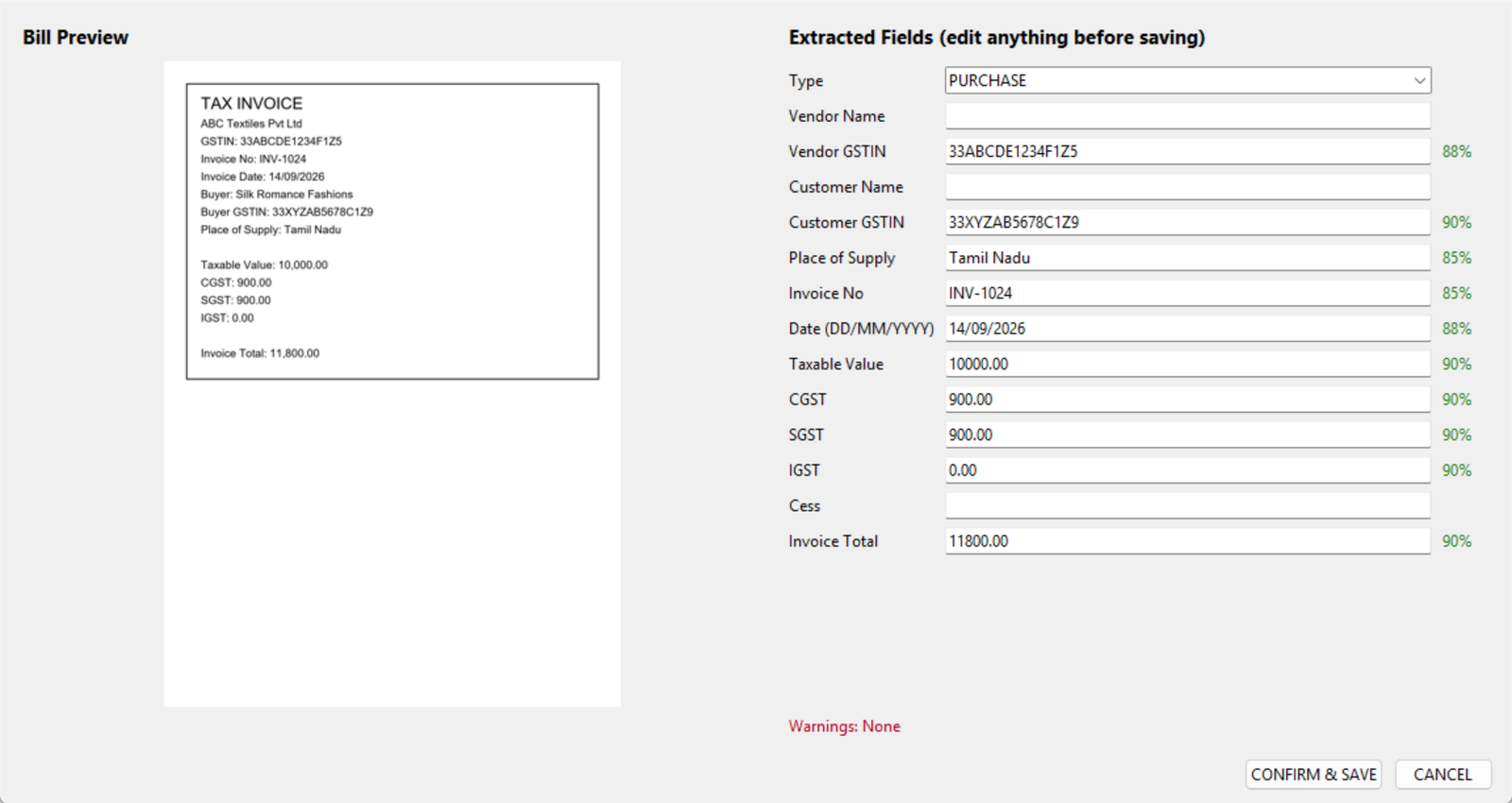
The app reads the bill on your computer and pulls out the invoice number, date, GSTINs, taxable value, CGST, SGST, IGST and total.
Check and correct
Every field shows a confidence score next to the bill image. Fix anything that looks off, then confirm.
Export for your accountant
At month end, one button gives you an Excel with Purchases, Sales, Vendor and Customer summaries, a GST summary and a Needs Review list.
What you get
Everything a small business needs to keep bills in order — and nothing that belongs in an ERP.
Monthly dashboard
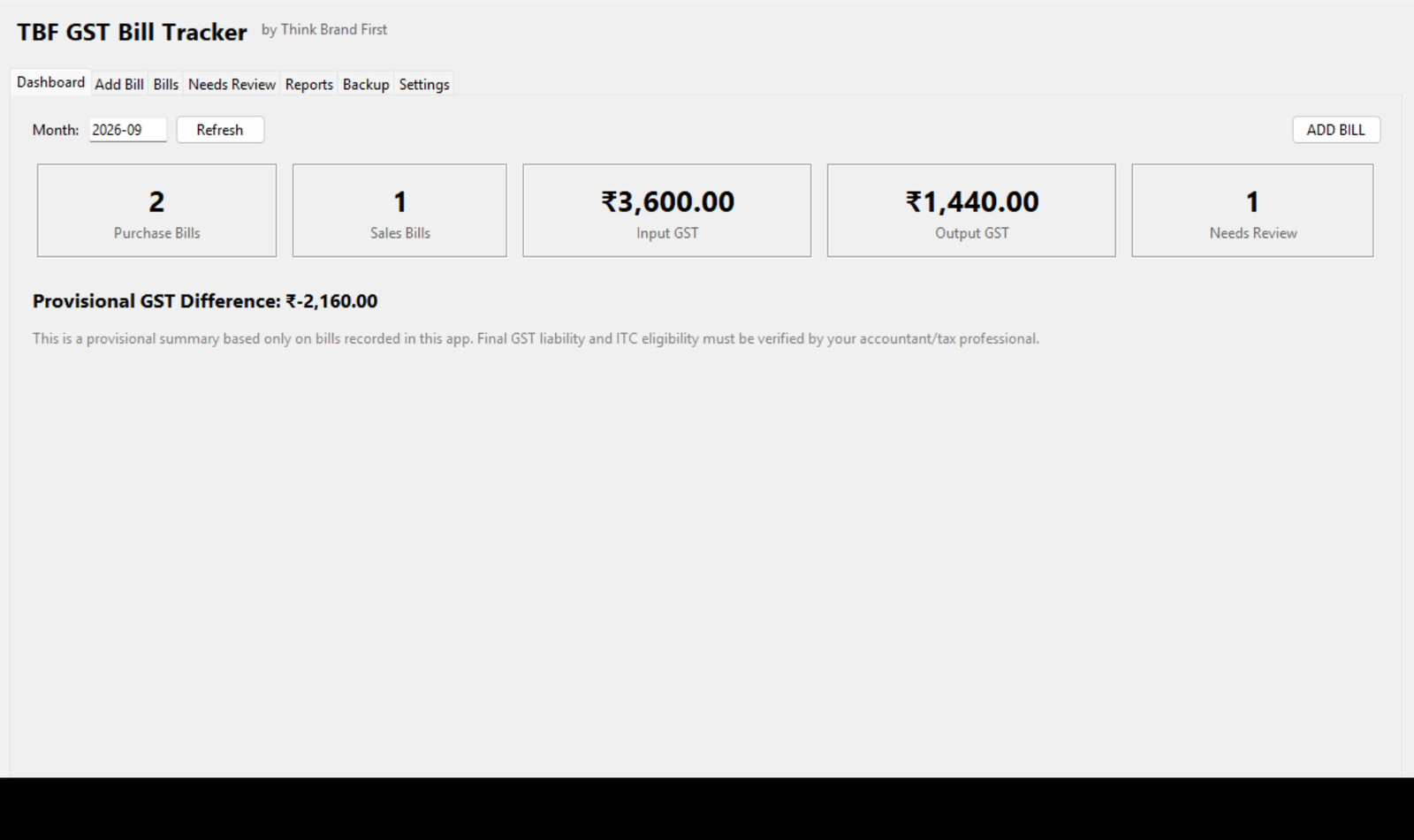
Purchase bills, sales bills, input GST, output GST and a provisional difference for any month.
Vendor and customer summaries
Bill count, taxable value and GST totals per vendor and per customer, filterable by month.
Needs Review list
Low-confidence scans, GST maths that does not add up, invalid GSTINs, missing invoice numbers and possible duplicates — all in one place for month-end cleanup.
Duplicate protection
The same bill scanned twice is caught by file fingerprint and by invoice number, date and GSTIN.
Local backup and restore
One click makes a backup zip of your database and bill copies. Restore it on the same or a new PC.
Works without internet
Scanning, saving, dashboards and Excel export all run on your computer. No account, no login.
See the app before you download it
These are real screens from TBF GST Bill Tracker — built to make checking and month-end handover straightforward.
Your bills stay on your computer
Local scan means exactly that: the bill image, the extracted numbers and the database live in a folder on your PC. Nothing is uploaded and there is no cloud account.
Your contact details and bill data stay separate
The download form sends only the contact details you enter to Think Brand First. It never sends your bill files, extracted values or local app database to the CRM.
What this app is not
It is deliberately small. If you need any of these, you need different software.
- GST return filing (GSTR-1, GSTR-3B)
- GST portal login or GSTR-2B download
- E-way bill or e-invoice generation
- Accounting ledger or journal entries
- Invoice creation
- Inventory, stock or payroll
- Bank feeds or reconciliation
- Multi-user cloud software
Questions
Is it really free?
Yes. The Windows app — scanning, saving, dashboards, Excel export and backup — is free with no time limit.
Which computers does it run on?
Windows 10 and Windows 11 (64-bit). No other software needs to be installed; the scanner is built in.
Where is my data stored?
In a folder called TBF-GST-Bill-Tracker inside your Documents folder: a small database file, copies of the bills you imported, your Excel exports and your backups. You can copy that folder anywhere.
How accurate is the scan?
Clear printed bills scan well. Blurry phone photos scan less well — which is why every bill goes through a verification screen with confidence scores before it is saved. You are always the final check.
Does it tell me how much GST to pay?
No. It shows a provisional difference between the output GST and input GST recorded in the app. Final GST liability and input-credit eligibility depend on many things this app does not know about, and must be confirmed by your accountant.
Does it check whether a GSTIN is genuine?
It checks the format (15 characters, correct structure and state code). It does not check with the GST portal whether the number is active.
Why do you ask for my WhatsApp number?
So we can send you the download link and let you know about updates. That is all it is used for, and you can opt out any time.
Get TBF GST Bill Tracker for Windows
Submit your details to unlock the download. If the installer is still being prepared, we will send the link on WhatsApp.
GST summaries in the app are provisional and based only on bills recorded in it. Final GST liability and ITC eligibility must be verified by your accountant or tax professional. TBF GST Bill Tracker is not affiliated with the GST Network or any government body.